The Agent-to-Agent Economy in Claude Routines
Using agents to set real-time prices in Radius Merchant Console
Most page requests hitting your website are no longer people. They are crawlers, AI search indexers, assistants fetching a page for one user's question, and almost all of them read for free or are simply blocked.
As bot traffic increases, site owners need to understand which visitors are willing to pay for access and at what price point.
We wanted to launch a live experiment where prices are modified in real-time using Radius Merchant Console.
All that was needed was a single prompt in Claude Routines:
Create a routine that finds AI agent and bot traffic in my analytics and charges it via Radius Platform.
Claude read a pricing policy through the Radius Merchant Console MCP, queried a week of traffic from a website or data service, asked two questions, and scheduled a routine that now runs every day.
This post walks through the setup so you can repeat it on your own site or API with whatever traffic data you already have.
What you need
- A project in the Radius Merchant Console, with the endpoints you want to sell and a gate (installed in CF Worker, Docker, or Kubernetes) enforcing its policy.
- Claude with routines, which are scheduled tasks that start a fresh Claude session on a timer.
- Traffic data Claude can query. We used Cloudflare Analytics Engine. Product analytics, server logs or a warehouse table work the same way, as long as each request records who it claims to be and what your edge verified about it.
Step 1: Connect the Merchant Console MCP
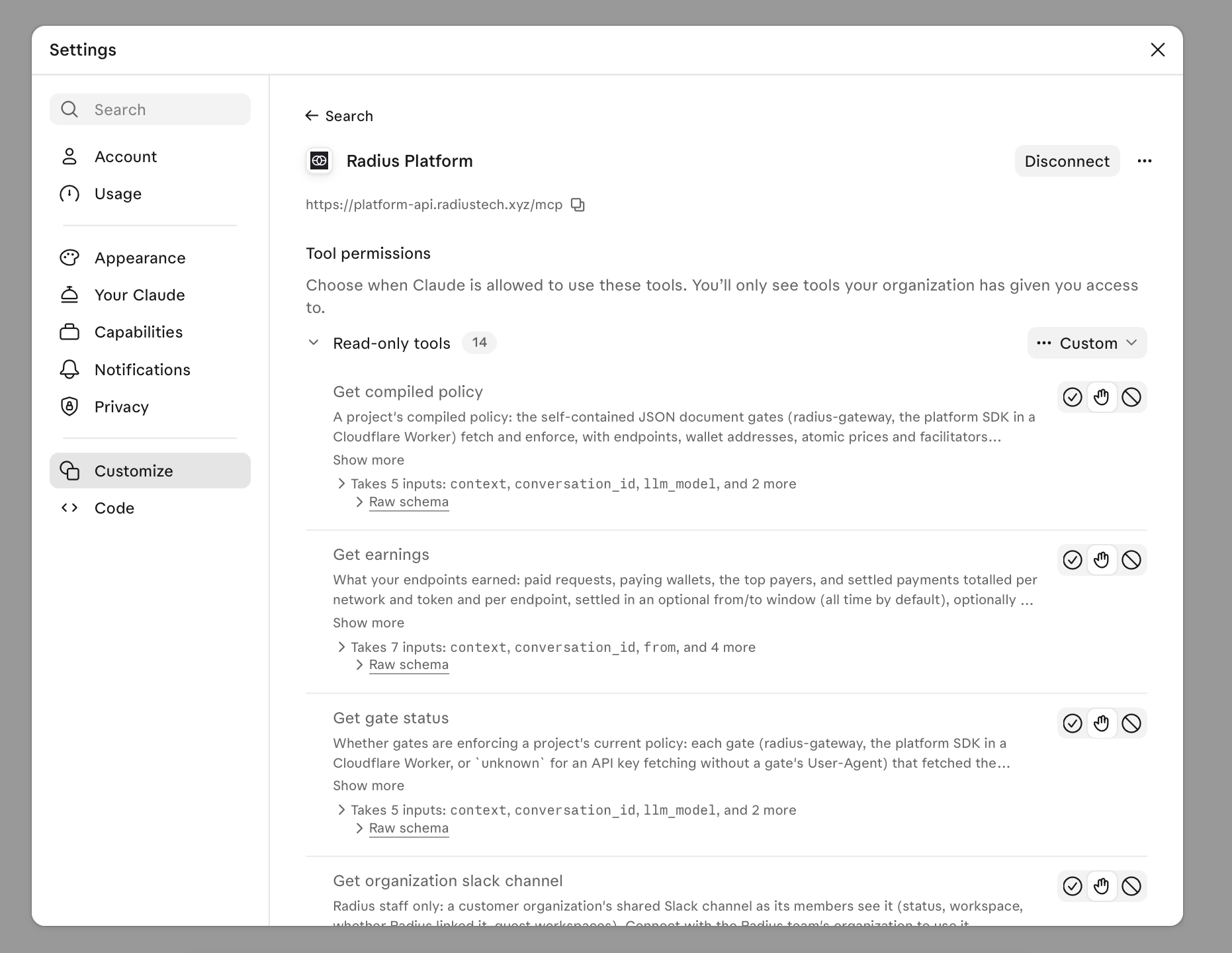
Add the Radius Platform connector to Claude with the URL https://platform-api.radiustech.xyz/mcp and sign in to your organization. The connector gives Claude the same controls you have in the console: read a project's policy, check that a gate is enforcing it, list payments and earnings, and write a new policy.
Set the tool permissions before you automate anything. A good starting point is to always allow the read-only tools, such as Get policy, Get earnings and Get gate status, and to decide deliberately about the write tools.
Step 2: Give Claude your traffic data so it can anchor prices to reality
The routine can only price what it can see, so the first decision is which data it reads. Any source works if each request records four things:
- the path that was requested
- the response status
- who the client claims to be (User-Agent, Signature-Agent)
- what your edge verified about it (a verified bot category, a Web Bot Auth signature, or a payment)
The fourth field is the one that separates sources. A source that has it can drive automatic charging. A source that only has the claim is good for sizing the opportunity and for propose-only mode.
Cloudflare Workers Analytics Engine. This is what we used. The Worker that runs the gate writes one data point per request, including Cloudflare’s verified bot category and the signature result, and Claude queries it with SQL over HTTP. Choose this if you already run a Worker in front of your site, because you decide exactly which fields are recorded.
Cloudflare zone analytics. If your site is proxied by Cloudflare, you already have crawler data without writing any code. AI Crawl Control shows which AI crawlers request which paths, and the same data is available through the GraphQL Analytics API. This is the fastest way to get a first read on a site you have not instrumented.
PostHog. If your product analytics already live in PostHog, Claude can query them through the PostHog connector. PostHog labels traffic as regular, AI agent, bot or automation, and names the bot and its operator. Two things to know. Most bots do not run JavaScript, so the browser SDK never sees them; forward your server or CDN logs to PostHog as $http_log events to capture that traffic. And the labels come from the User-Agent string, so they tell you who a client claims to be. Use PostHog to measure demand and propose prices, and pair it with a verified signal from your edge before charging automatically.
Server logs or a warehouse. Access logs from nginx, a CDN or a load balancer, landed in BigQuery, Snowflake or ClickHouse, work the same way. Check that the logs keep the verification fields from your edge. If they only keep the User-Agent, treat them like PostHog above.
Connect the source to the routine
A routine runs in a cloud environment that you configure, and there are two ways to give it data. If the source has a connector, as PostHog does, attach the connector to the routine. If the source is an HTTP API, as Analytics Engine is, give the environment access to that one host. Ours is called Website Agent Pricing and has three settings that matter:
- Network access limited to the analytics host and the pricing API.
- A network secret for the API token. The environment’s proxy adds the credential to outgoing requests, so the token never appears in the session or in anything Claude writes.
- One environment variable for the account ID.
The environment is a real boundary. A routine that can reach one analytics host and one pricing API cannot do much else, which is what you want from something that runs unattended.
Step 3: Ask for the routine
Give Claude the sentence above.
Create a routine that finds AI agent and bot traffic in my analytics and charges it via Radius Platform.
Before it scheduled anything, it did the work a careful engineer would do first:
- It read the live policy and confirmed a gate was connected and on the current version.
- It queried seven days of traffic and split it by what the edge had verified, not by what each client claimed.
- It noticed we already had an hourly routine that only proposes price changes, and that the new one would write to a live policy.
Then it stopped and asked how much it should do on its own.

The three choices were to charge verified agents automatically, to propose changes for approval, or to charge all automation including unverified bots. We chose the first, with a daily schedule.
What the data showed
In the seven days before we set this up, our docs site served about 780 free successful responses to agents that Cloudflare had verified as AI crawlers, AI search, AI assistants or SEO crawlers. The same agents received 16 payment requests. The policy already charged per page after a free allowance, but the allowance was counted per IP address, and a crawler that spreads its requests across many addresses rarely reaches it.
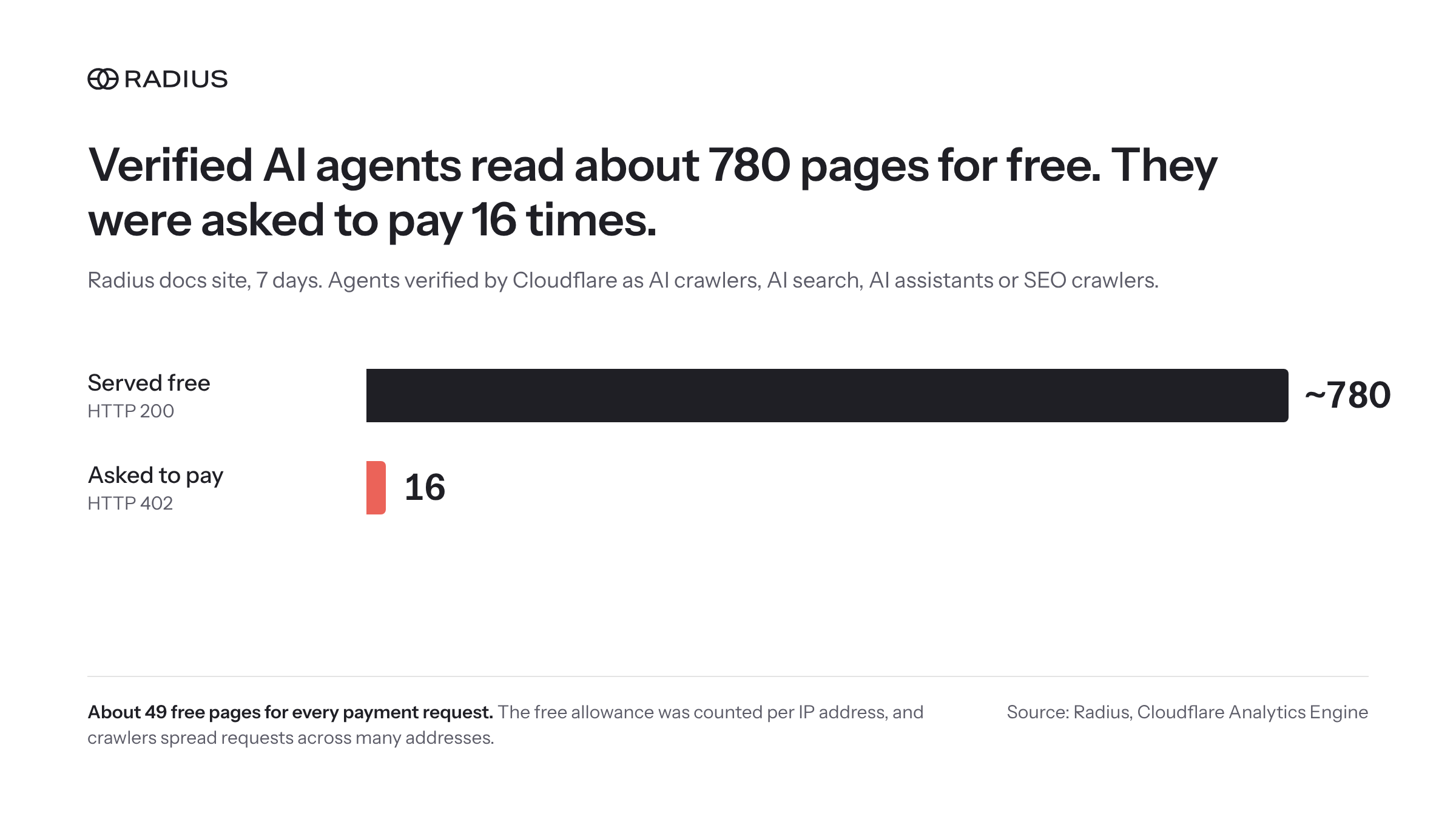
That is the kind of gap a person does not notice and a routine finds on its first read.
What the routine does every day
- Reads the policy and the gate status from the Merchant Console.
- Queries the last day and the last week of traffic.
- Finds agents that qualify: categories verified by the edge, and agents that sign their requests with Web Bot Auth and show up repeatedly.
- Writes at most one policy change, adding a rule for those agents on endpoints that already have a price.
- Reports payments, earnings, and how many agents paid versus walked away.
The rule it manages looks like this:
- id: auto-verified-agents
  match:
    agent:
      category: [ai_crawler, ai_search, ai_assistant, search_engine_optimization]
  free_quota:
    key: agent
    quota: 20
    window: 1d
  action:
    type: charge
    price: '0.002'
    description: Radius API, SDK and CLI reference page, verified agent
The important line is key: agent
The free allowance is counted per verified agent, not per IP address, so each operator gets 20 free pages a day for discovery and pays 0.002 USD in SBC for each page after that.
Guardrails for automated pricing
An unattended agent with write access to your prices needs limits you can read. Ours are written into the routine:
- Verified agents only. A User-Agent string is a claim, not evidence. The routine acts on what the edge verified or what a signature proves, and only reports the rest.
- People are never charged. Its rules match verified agents and nothing else. If browser traffic starts receiving 402, 403 or 429 responses, it makes no new charge and can remove its own rules.
- Search engines, link previews and monitors stay free.
- It edits only the rules it owns. Every rule it writes has an id starting with
auto-. Your prices, quotas and rate limits are sent back unchanged. - One change per run, and none if the gate is not connected.
- A ledger. Each run records the decision, the policy version, and the numbers behind it.
One practical note: a routine starts a fresh session, so attach the Radius Platform MCP connector to the routine itself. Without it the routine can read your traffic but cannot change a price.
What else you can build
The pattern is data in, policy out, on a schedule. The data and the policy are yours to choose.
- Price tuning. Raise or lower a price by a bounded step when conversion changes, and score each change a week later.
- Propose only. Keep a person in the loop. The routine drafts the exact policy change and you apply it.
- Per-operator terms. Give signed agents from a partner a larger allowance or a different price.
- Paid APIs and MCP servers. Use request logs and upstream cost to set per-call prices, and deny routes that only scanners ask for.
- Other data sources. Product analytics, a data warehouse or your accounting system can drive the same loop.
Try it
Create a project in the Merchant Console, connect the MCP server to Claude, and describe the routine you want in one sentence. Start in propose-only mode if you want to watch it for a week first.
Interested in learning more? Book a demo with our product team.